Clipboard Historyby Pankovs
Clipboard History for Chrome: everything you copy stays on this computer.
A searchable history of the text you copy in Chrome. Pin it, tag it, copy it back. It makes no network requests at all.
Free, with no paid version and no account.
New: first released 10 Oct 2026. Chrome Web Store numbers appear here once there are enough to mean something.
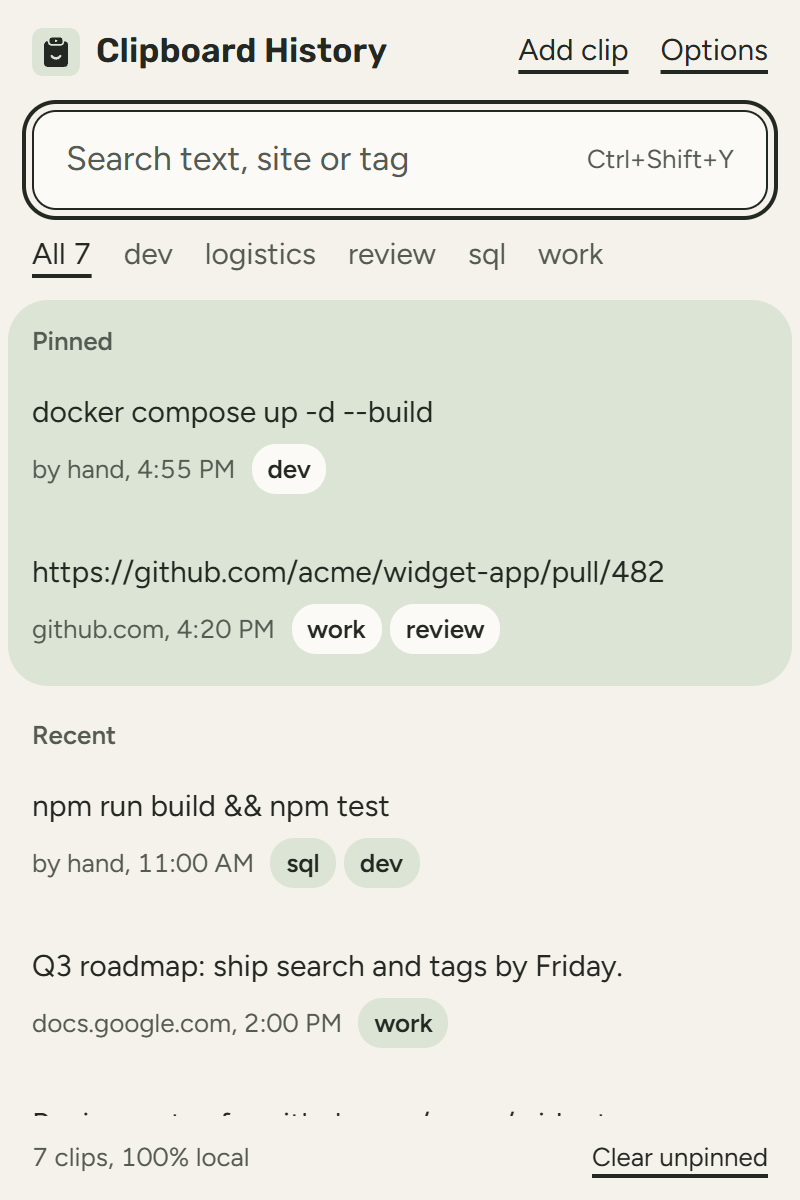
What the release check found
Network connections the extension may open: none.
- network policy
- connect-src 'none'
- site access
- optional, asked once
- account
- none
- storage
- this computer only
Raw row
{"name":"manifest: CSP blocks network (connect-src 'none')","pass":true}Version 0.1.4 release build, captured 13 Oct 2026. Its release check on 12 Oct passed 121 of 121, network block included. The clips in the picture are demo text.
Who it is for
If you lose something you copied ten minutes ago. Search for it by a word, a site or a tag.
If you copy code, SQL and links all day. Pin the ones you reuse and tag the rest.
If you do not want a cloud clipboard. There is nothing to sign in to.

How it works
Clips are stored in Chrome's local storage on this computer.
The extension's security policy blocks every network connection, so it cannot send anything even by mistake.
Uninstall it and the history is gone with it.
What it costs
Free, with no paid version and no account.
- Clipboard History
- free
Never charged: There is no paid version and nothing to subscribe to.
What it will not do: It sees only copies made on web pages in Chrome, not copies from other apps.
What it never saves and what it asks for
- Never saved
- Password fields
- storage
- to keep your history on this computer
- scripting and optional site access
- to notice when you copy on a page; you grant it once, and can refuse
- offscreen and clipboardWrite
- to copy a clip back when you click it
I will never sell this extension or hand it to anyone else.
Your history leaves this computer only when you export it.
What's new
0.1.5, released 13 Oct 2026
Fixed- Copy buttons for passwords are no longer saved on sites built from web components, for example a “Copy password” button inside a custom element, or a button that copies a password field from the same component.
- Text you copy from a password field inside a web component, even one that shows the password, is no longer saved, and text you copy from a normal field there is saved as usual.
- A page that calls the clipboard without any text now gets the same error it would get without the extension, and nothing is saved.
0.1.4, released 12 Oct 2026
Fixed- Copy buttons on web pages are saved now, for example the copy button on a GitHub code block. Before, only text you selected and copied yourself was saved.
- When a site changes what you copy, for example by adding a source link or a copyright line, history now saves exactly what landed on your clipboard instead of the text you selected.
- A site can only add to your history right after you click or press a key, once per click, and copy buttons for passwords, card numbers or one time codes are never saved.
0.1.3, released 12 Oct 2026
Changed- A calmer new look in the Pankovs style: a light theme with the Rubik and Figtree fonts, built into the extension so nothing loads from the web.
- Actions are plain text links: Add clip and Options at the top, Pin, Unpin and Delete on the clip you point at, Clear unpinned at the bottom.
- Pinned clips sit on their own green panel, and clips you added yourself are marked “by hand”.
- Sharper toolbar icon at small sizes.
- The Options page shows what is never saved (password fields, card details, one time codes) next to your settings.
- The dark theme is gone for now; the extension always uses the light theme.
- Pause capture now applies at once without touching unsaved history size or excluded domains.
Added- When capture is paused, the popup says so and has a Resume capture link.
- While you search or filter by tag, the footer shows how many clips match, for example “3 of 7 clips”.
- When a search finds nothing, the popup repeats your search and explains where it looks.
0.1.2, released 12 Oct 2026
Fixed- Card security codes (CVV), expiry dates and one time code fields are no longer saved when a site names the field only by its visible label.
- Card numbers are no longer saved when the copied text contains other words, for example “Card: 4111 1111 1111 1111” or a table row with a card number, or when the digits are separated by dots.
- One time codes copied from an email or text message, such as “Your verification code is 482913” or just “482913”, are no longer saved.
- Plain text copied next to a card form, such as the help line under a card field, is saved again when it holds no card details.
0.1.1, released 11 Oct 2026
Changed- New look in the Pankovs style with dark and light themes that follow your system setting.
- Clips are grouped into Pinned and Recent, with tags shown as small labels next to each clip.
- Delete appears when you hover a clip, and a short “Copied” label confirms copy-back.
- New app icon: a clipboard with a smile.
Fixed- The Add button keeps its size when the text field grows.
0.1.0, released 10 Oct 2026
Added- Local clipboard history: copies on websites are saved in your browser only, with search, pins, tags, copy-back, delete and clear.
- Sensitive fields (passwords, card numbers, one-time codes) and excluded sites are never saved; capture can be paused.
- Export your history to a JSON file and import it back without duplicates.
- Clipboard History has its own icon in the toolbar, on the extensions page and in the store.
Fixed- Options: an excluded site typed and saved right after opening the page is now always kept. Before, it could be silently dropped while the page still showed “Saved.”.
Privacy
Clips, their site names, times, pins and tags are kept only in Chrome's local storage on this computer.
You do not need an account, and nothing is synced or counted. The extension cannot open a network connection.
Questions
Does it see what I copy outside Chrome?
No. Chrome does not let extensions read the system clipboard, so only copies made on web pages are saved.
How many clips does it keep?
500 by default, or the limit you set. Pinned clips are never removed automatically.
How do I open it?
Press Ctrl+Shift+Y, or Command+Shift+Y on a Mac, or click its icon.
Can I move my history to another computer?
Yes. Export it to a JSON file and import it on the other computer.
Why does it ask for access to all sites?
To notice when you copy on a page. The access is optional: without it you can still add clips by hand.
Another question? Write to me at info@pankovs.com.
Made by the same hand as these. Every tool here is drawn on one grid and checked before every release.
Add to ChromeAll tools by Pankovs
Sitemap Health Monitor
Tells you which pages broke since the last check
v0.1.11, 12 Oct 2026
PDF to Markdown
Turns PDFs into clean Markdown for LLMs
v0.2.11, 14 Oct 2026
Clipboard History
Keeps what you copy, on your computer only
v0.1.5, 13 Oct 2026
RSS Feed Aggregator
Merges feeds and shows each story once
v0.1.5, 13 Oct 2026
Local PDF Merge
Merges and splits PDFs without uploading them
v0.1.1, 12 Oct 2026